How to Design a Segmentation-First Checkout Upsell Strategy on Shopify Plus
A segmentation-first checkout strategy flips that. Instead of “what can we add to checkout?”, you ask “who are we talking to right now, and what do they actually need?” In this article, we’ll walk through how to design a segmentation-first checkout upsell strategy you can implement with tools like Checkout Components, without needing a developer.

If you’re like most Shopify Plus brands, you’ve already tried upsells somewhere in the journey. Maybe a cart drawer widget. Maybe a post-purchase offer. Maybe a “people also bought” section that kind of worked… until it didn’t.
The problem usually isn’t upsells themselves, it’s that they’re not built on a strategy.
A segmentation-first checkout strategy flips that. Instead of “what can we add to checkout?”, you ask “who are we talking to right now, and what do they actually need?” In this article, we’ll walk through how to design a segmentation-first checkout upsell strategy you can implement with tools like Checkout Components, without needing a developer.
Step 1: Start with business goals, not widgets
Before you touch a single component, get painfully clear on your goals:
- Do you want to increase AOV from specific categories?
- Do you want to lift conversion from cold traffic?
- Are you trying to grow subscriptions or loyalty sign-ups?
- Do you need to reduce support volume from confused customers?
Pick one primary and one secondary goal for checkout. Everything else is a distraction. For example:
Primary: Increase AOV from supplement carts by 15%
Secondary: Grow subscription adoption for consumable products
That focus will drive what segments and experiences you design next.
Step 2: Choose your “segmentation spine”
Segmentation at checkout can get wild quickly. The trick is to pick a small set of core dimensions you’ll build around, instead of trying everything at once.
Common, high-leverage dimensions:
- Customer type - first-time vs returning, VIP tags, loyalty tiers
- Cart context - category mix, hero product, cart value, presence of subscriptions
- Location & market - country, currency, shipping address nuances
Pick 2-3 primary dimensions that directly support your goal. For our supplement example:
- Customer type (first-time vs returning)
- Cart context (supplements vs accessories vs mixed)
- Cart value (below/above free-shipping threshold)
This becomes your segmentation spine.
Step 3: Map segments to specific checkout experiences
Now bring it down to earth. For each segment, define:
- What should they see at checkout?
- What single action do we want them to take?
Examples:
- First-time customer + supplement-only cart
- Experience: Starter bundle upsell plus a small educational callout explaining how products work together.
- Desired action: Add bundle to cart OR at least keep existing cart and feel confident.
- Returning VIP + cart value > $200
- Experience: “VIP-only” accessory upsell with a stronger discount and a message reinforcing their status.
- Desired action: Add high-margin add-on and feel rewarded for loyalty.
- International customer + below free-shipping threshold
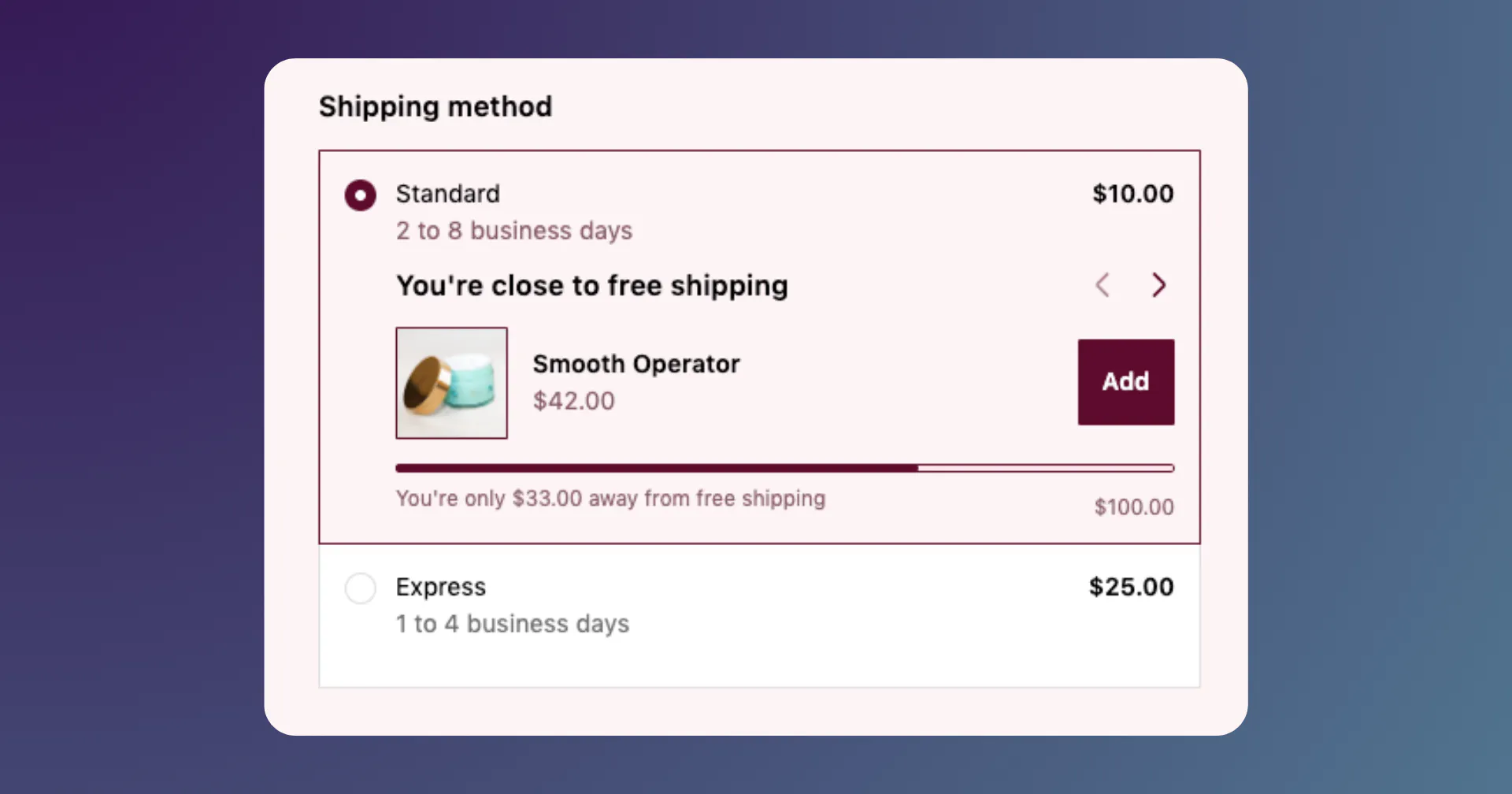
- Experience: Free shipping threshold banner with a small, low-friction product suggestion to nudge them over the line.
- Desired action: Increase cart value to unlock better shipping.
The key: one main ask per segment. Don’t hit them with three different upsells and a loyalty CTA and a newsletter popup at the same time.
Step 4: Decide where each segment should “live” in checkout
Not every message belongs in the same place. With Checkout Extensibility and tools like Checkout Components, you can decide:
- Top of checkout (above payment) - big, universal moments like shipping thresholds or trust content
- Line-item area - product-adjacent upsells, bundles, subscription toggles
- Sidebar / order summary - complementary products, small add-ons
- Below CTAs - loyalty CTAs, BNPL calculators, review content
For each segment, answer:
- Where will this message be most contextually relevant?
- What should the customer see right before they make a decision?
Don’t be afraid to keep it minimal. A segmentation-first strategy is about showing the right thing to fewer people, not showing more things to everyone.
Step 5: Translate strategy into rules (without engineering)
Now we cross the bridge from “deck” to “reality”.
Using a rules engine like Checkout Components’ Advanced Display Rules, you can translate your segmentation spine into actual conditions:
- Customer tags: `VIP, LOYALTY_GOLD, FIRST_ORDER`
- Cart conditions: contains product type “supplement”, subtotal > X, contains subscription item
- Market rules: render only for AU/NZ, or for specific currencies
- Source data: UTM parameters or referrer where available
Start simple:
- 3–5 core components
- 1–2 conditions per component
- One dedicated “playground” market or traffic source if you’re nervous
Then grow complexity as you see what works.
Step 6: Decide how you’ll measure success (before launch)
A segmentation-first strategy only works if you can see what each segment is doing.
Before you launch, define:
- Primary metrics: AOV for segment, upsell take-rate, incremental revenue per checkout session
- Secondary metrics: Checkout conversion rate, support tickets related to checkout, NPS/CSAT if you collect it
Then:
- Tag components clearly by segment and goal (e.g. `SUPP_FTC_BUNDLE`, `VIP_HIGHVALUE_ACCESSORY`)
- Use Checkout Components’ Analytics to see which conditions and components actually move the needle over time.
The goal isn’t to get everything perfect on day one. It’s to get enough signal to iterate with confidence.
Step 7: Launch small, iterate often
Final mindset shift: this is not a “set and forget” project. It’s a living system. Update it regularly.
Good practice:
- Start with 2–3 high-impact segments
- Run them for long enough to gather meaningful data
- Kill or tweak under-performers ruthlessly
- Add new segments only when you’ve proven the old ones
When you treat checkout segmentation as an ongoing growth program, not a one-time setup, that’s when Checkout Components really shines. You stop arguing about “what might work” and start using real segment-level data to design your next move.

Blake Waldron
A software engineer with over a decade in ecommerce and 400 Shopify builds delivered under his leadership at a Shopify Platinum Partner. Created Checkout Components out of pure passion which now supports over 600 Shopify Plus stores around the world.