New Feature: Rebuilt display rules, and a way to test them before you publish
Display rules, which decide when a component shows in checkout, have been rebuilt. You can now describe a shopper and a cart in the admin and see whether your rules would pass, without placing a test order.
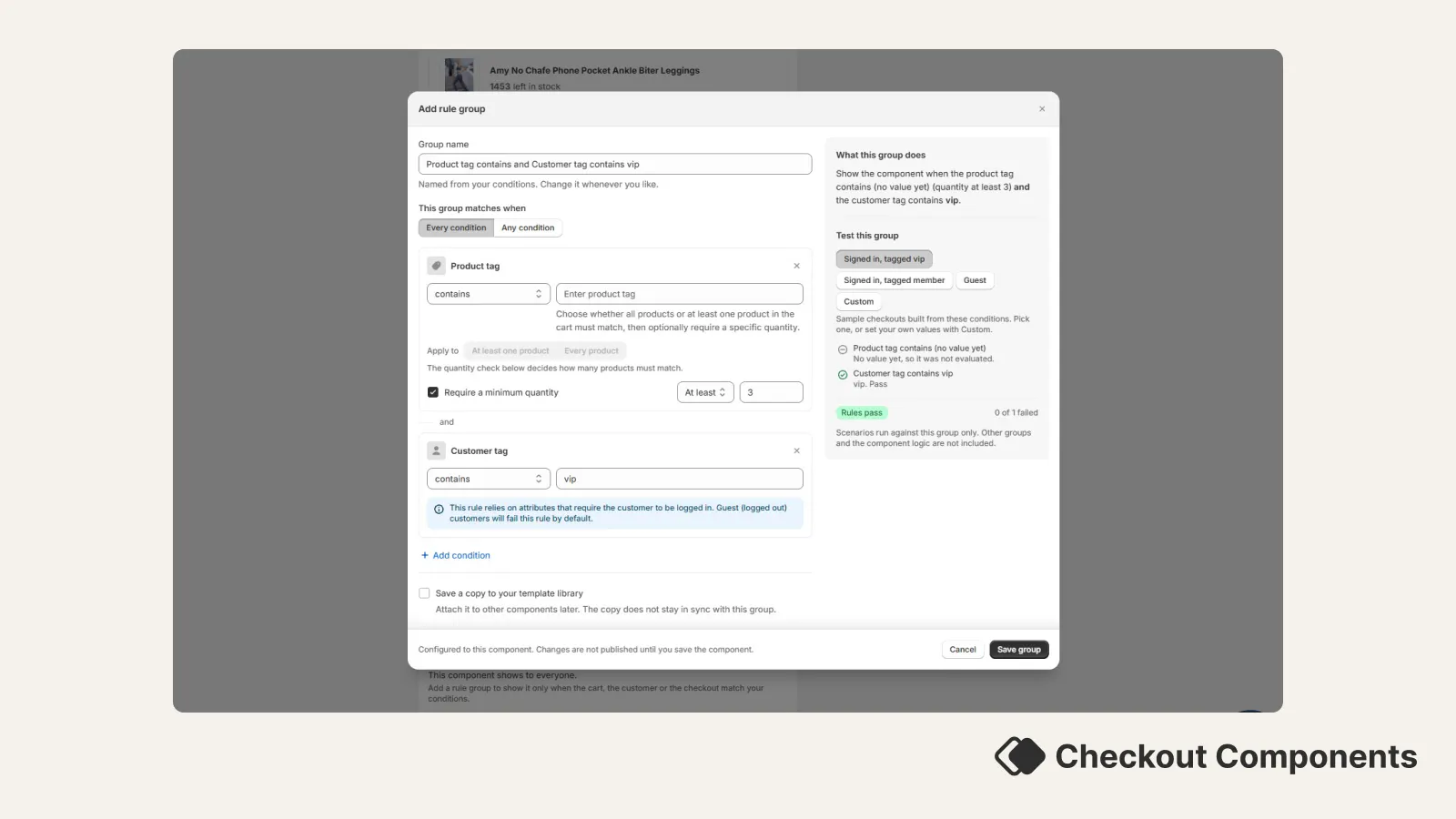
What's new. Rules are organised into groups. A group holds a set of conditions, and you choose whether every condition has to be true or any one of them. Each condition is edited where it sits, so you can see the whole group at once instead of opening one rule at a time.
Finding the right condition. The condition picker is grouped by what the condition looks at: the cart, the customer, the products, shipping, attribution, and line items. There is a search box, and the conditions merchants reach for most are surfaced first. Every condition carries a plain description of what it actually compares.
Rules that explain themselves. Some conditions do more than they appear to. A product condition can range over every item in the cart, so the rule builder now spells it out underneath: Matches when at least one product in the cart is tagged with something containing sale. Turn on a quantity check and the sentence updates: Matches when the cart holds at least 2 products tagged with something containing sale. Cart attribute and line item property conditions do the same, including a warning where a negative condition is easier to satisfy than it looks.
Test your rules on the spot. Every group has a testing panel. Pick one of the ready-made scenarios, or fill in your own cart value, customer tags, country, shipping method and so on, and you get a verdict: Rules pass or Rules do not pass, with a tick or a cross beside every condition and the reason it went that way. Conditions that cannot be judged from the scenario say so rather than guessing. You can also test the component as a whole, across all of its groups at once.
Guest checkouts are called out. Conditions that read customer-account data cannot be checked for a shopper who is not logged in. Those conditions now carry a notice explaining what happens for guests, and where you have a choice about it, the choice sits right there on the condition.
Reuse a set of rules. Save a group as a template and start future groups from it. Templates are searchable once you have a few, and each one shows a summary of the conditions inside it so you can tell them apart. Templates are independent copies, so deleting a template does not remove the rules from components already using them.
Existing setups. Your current rules are unchanged and behave exactly as before. The rebuild is in how you read and edit them, not in how they are evaluated in checkout.